

Employee data API: Field level permissions
Learn how field-level permissions affect the public API
Overview
HiBob’s field-level permissions model gives customers more flexibility and control when granting Public API access to employee data. Access can be managed for each individual field, rather than only at the category level.
Employee field permissions are configured under People’s data > People’s fields.
Notes:
- This applies to endpoints that read or update employee data (Employee search, read employee tables, etc.). Permissions for other entities, such as Goals, Job Catalog, or Positions, remain unchanged.
- Public API guides (Categories and permissions, Service users, People, Employee tables) describe the field-level model. This article adds partner-focused migration detail, sensitive-field rules, and restricted-column response behavior.
What’s changing
From category-level to field-level permissions
Previously, permissions were granted at the category level (e.g., Work, Personal, About). To access a single field, developers had to request access to the entire category.
Now, each field has its own permission settings. Although category permissions still exist, the fields inherit or override them. You can open access to just the fields your integration needs, without exposing the whole category.
Customers will be prompted to choose permission behavior when adding or moving fields between categories.
“People” becomes “People’s Fields”
The former People permission section is now called People’s fields, reflecting its new scope and structure within People’s Data.
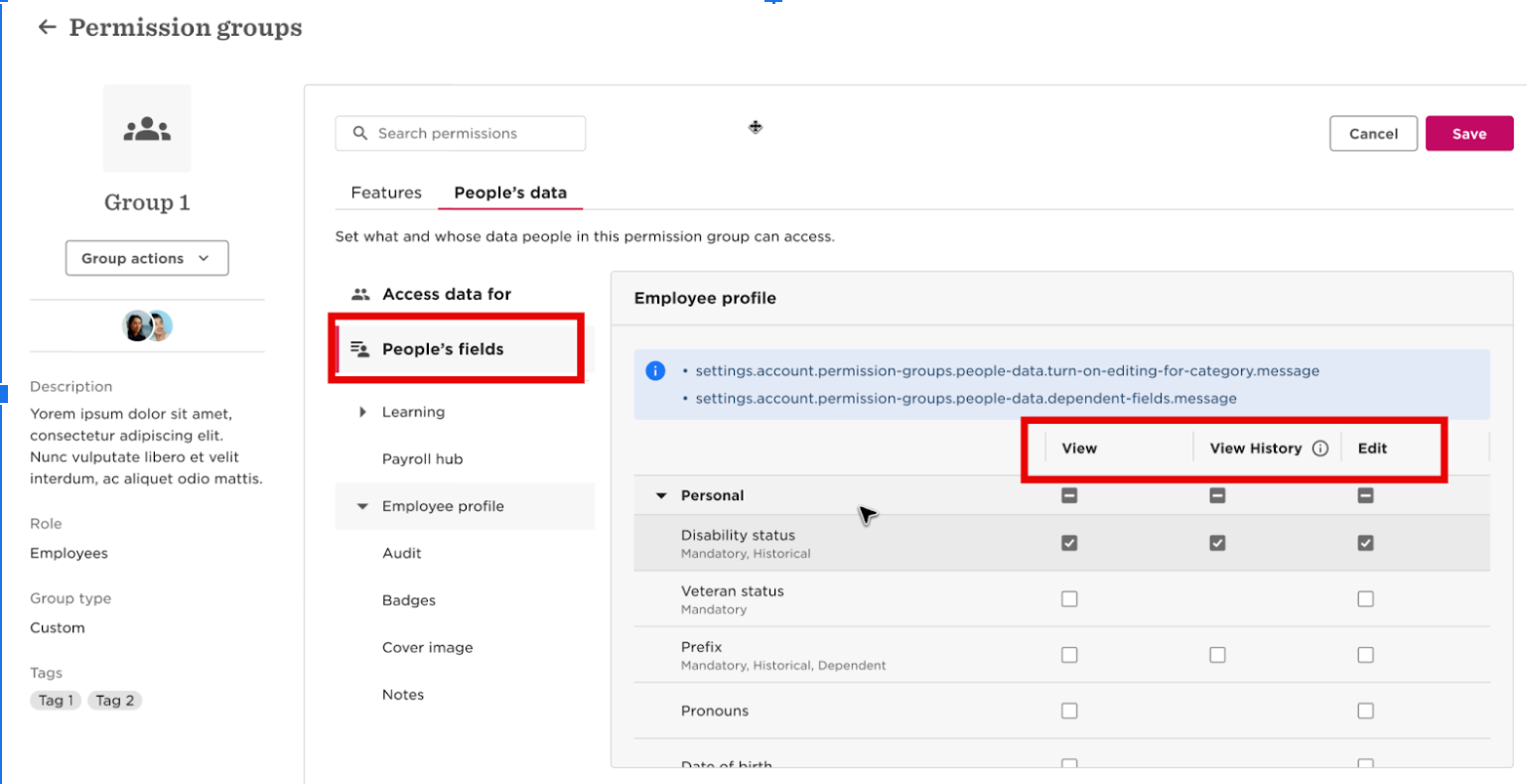
Sensitive field logic still requires View and Edit
Some fields (e.g., SSN, full date of birth, age) are enforced with hard-coded logic that requires both View and Edit permissions to be visible via API. This extra care for sensitive fields continues to apply under field level permissions, which do not remove this requirement.
You can still grant access at the individual field level (instead of the whole category), but for these sensitive fields the service user must have both View and Edit on that field.
During migration, field permissions are adjusted to maintain the previous behavior:
- If your service user previously had View and Edit permissions for these fields, they will automatically maintain this access.
- If it had View but not Edit, these sensitive fields will now have no access, maintaining previous behavior.
See more details in migration behavior.
How field-level permissions work
- Categories still exist, but as containers. Categories still organize fields, but permissions now apply to each field individually. Category-level permissions continue to exist, but now they act as defaults or inheritance points for the fields inside them.
- You can now open a field without opening a category. Allow access to a single field even when the rest of its category should remain restricted. For example: You can permit access only to Work > Working location, while keeping the rest of the Work category closed. This allows integrations to target only the data they actually need.
- New logic when fields move between categories. When a field is moved to another category, Bob Admins are prompted to choose:
- Set the field’s permissions to No access by default
- Inherit the new category’s permissions (previous behavior)
This prevents unintentional permission side effects when reorganizing fields.
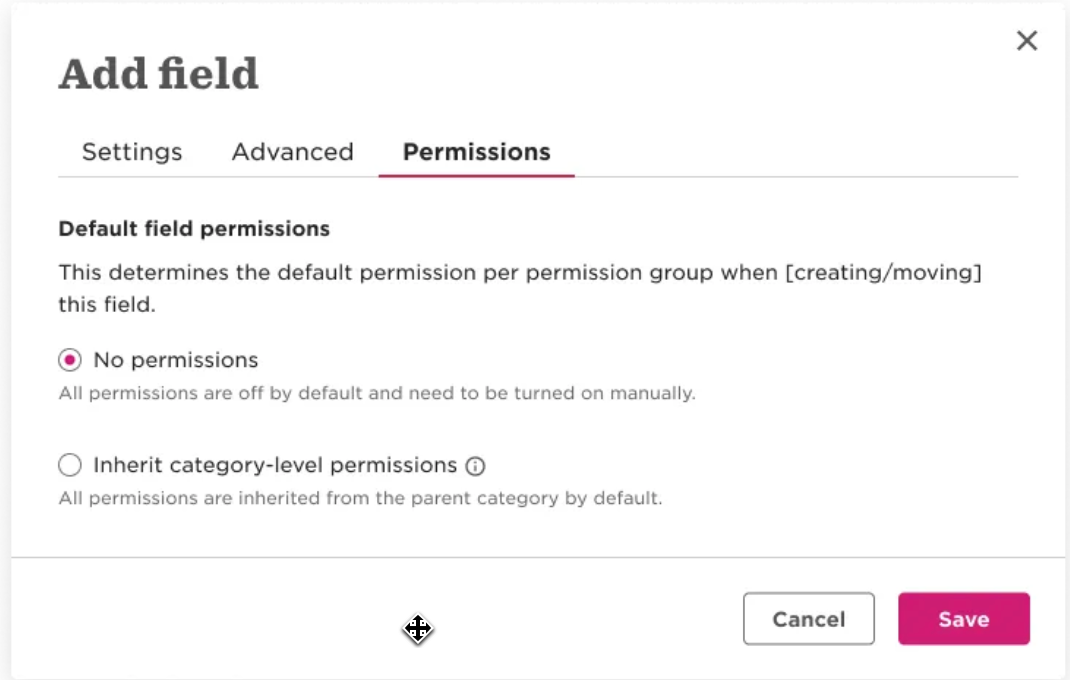
Note: Integrations should continue using the Fields Metadata API (GET /company/people/fields) to confirm the category and availability of a field.
Detecting restricted columns in API responses
When the service user has partial column permissions, employee table endpoints return
metadata indicating which columns were filtered from the response.
Response metadata
When columns are restricted, the API response includes:
restricted_columnsobject in the JSON bodyX-Has-Restricted-Columns: trueHTTP header
This helps you distinguish between:
- A field that genuinely has no value (returns
null) - A field that was filtered due to missing permissions (listed in
restricted_columns)
Example response
{
  "values": [
    {
      "id": 1,
      "effectiveDate": "2024-01-15",
      "title": "Software Engineer",
      "department": null,
      "reportsTo": null
    }
  ],
  "restricted_columns": {
    "no_view_permission": ["salaryPayType", "fte"],
    "no_view_history_permission": ["department", "reportsTo"]
  }
}
Restricted column categories
| Property | Description |
|---|---|
no_view_permission | Columns filtered because the service user lacks View permission for these fields |
no_view_history_permission | Columns filtered because the service user lacks View History permission (only for historical tables: work, employment, salaries, lifecycle) |
Affected endpoints
This metadata appears in GET responses for employee table endpoints:
Single-employee table endpoints:
/v1/people/{id}/work/v1/people/{id}/employment/v1/people/{id}/salaries/v1/people/{id}/lifecycle/v1/people/{id}/training/v1/people/{id}/equities/v1/people/{id}/variable/v1/people/{id}/bank-accounts/v1/people/custom-tables/{employeeId}/{tableId}
Bulk table endpoints:
/v1/bulk/people/work/v1/bulk/people/employment/v1/bulk/people/salaries/v1/bulk/people/lifecycle
Best practices
- Check for the
X-Has-Restricted-Columnsheader to quickly detect if any columns were filtered - If you need specific column values, ensure the service user has explicit View permission for those fields
- Handle restricted columns gracefully in your integration logic
How does it affect existing integrations
With field-level permissions, access to employee fields is governed at two levels:
- Category-level: If a category is open, all fields in it are accessible unless field-level overrides restrict them.
- Field-level: Customers can explicitly open or restrict individual fields, even if the category is closed.
Together, these determine what the service user can read or update.
Practical examples
| Use case | Previously | Field-level permission |
|---|---|---|
You need to access the employee’s Birthday field | The customer had to grant access to the entire Personal category, exposing all fields in it (email, address, etc.). | The customer can grant access only to the Birthday field. |
| Your integration needs to access SSN (sensitive field) | Customer had to grant View + Edit to the entire category | Customer can grant View and Edit just to SSN (both are still required) |
Migration behavior
During migration to the new model:
- Permissions for employee fields are listed under People’s data > People’s fields (previously "People").
- Existing category-level permissions are automatically converted to equivalent field-level permissions.
- Sensitive fields migrate as follows:
- If the service user had Edit, they keep access.
- If they had only View, the field will now have no access until explicitly granted View and Edit (both remain required for these fields).
Note: The automatic migration ensures the behavior aligns with the intent of the previous setup and prevents the exposure of sensitive data without explicit permission. The hard-coded View + Edit requirement for sensitive fields (SSN, full DOB, age, etc.) is unchanged under field level permissions.
Action items for partners
- Update your integration setup instructions.
We recommend simplifying customer setup to use only the fields you need, not entire categories.- Instead of: People’s data > People > About > View selected employees’ About sections
- Use: People’s data > People’s fields > About > Email > View (and Edit only if needed; use category-level View history when reading historical tables)
- Keep sensitive fields instructions. For hard-coded sensitive fields (e.g. SSN, full date of birth, age), customers must still grant both View and Edit on those fields for the values to be returned via API. Update instructions to point at the specific fields under People’s fields, but do not drop the Edit requirement.
- We recommend testing and validating:
POST /people/searchPOST /people/{identifier}Any Custom Table or Employee Table endpointsAll custom fields you retrieveAny sensitive fields you currently expect in responses
- Confirm your setup:
- Confirm which fields your integration needs access to.
- Check whether any sensitive fields need both View and Edit.
- Update your permission instructions to specify exact fields under People’s fields.
- Test your integration’s installation and onboarding flow with field-level permissions.
Availability
Field-level permissions have been rolled out to nearly all customers. Accounts that still use the previous category-only model are being migrated. Employee field permissions appear under People’s data > People’s fields.
FAQs
Do I need to update my integration now?
Category permissions still work, but we recommend narrowing them to field-level access for least privilege and a smoother customer setup.
Do I need to update my integration documentation now?
Yes. Update setup instructions to use People’s fields, and prefer listing only the fields you actually use. Category-level grants remain valid where appropriate.
Will any fields stop returning values because of this change?
Not automatically. However, if customers adjust permissions or move fields, a field may become restricted. Integrations should handle missing fields gracefully.
Can I request access to just one field instead of a whole category?
Yes. Field-level permissions allow fine-grained access for exactly the fields you depend on.
What happened to SSN, DOB, and other sensitive fields?
You can grant access at the field level under People’s fields, but the hard-coded rule still applies: both View and Edit are required for these sensitive fields to be returned via API.
How can I check what permissions a field requires?
Use the GET /company/people/fields endpoint to retrieve field IDs and categories, then confirm with the customer that the service user’s group has access to this field.
Updated about 2 months ago